

Investigating a billing question by hand can take anywhere from twenty minutes to several hours and systems keep accumulating routing plans, rate tables, and traffic rules long after they’re actually needed. This post looks at how MCP-based AI skills tackle that, with usage-audit, so operations teams spend less time digging and more time acting on what they find.
This is part three of JeraSoft’s series on AI agents in telecom operations. Read part one: How JeraSoft enables billing platform to be AI ready and part two: MCP, skills and AI agents in telecom billing operations.
What is a skill, in plain terms?
An AI agent connected via MCP can, in theory, access everything your platform exposes. But access alone doesn’t make it useful. Without knowing what matters and how to reason about it, a general-purpose AI talking to a billing system is like handing someone your entire database and asking them to figure it out.
Skills solve this. A skill is a focused module that gives the AI agent deep, specific knowledge about one operational domain – what questions it should ask of the system, what data to pull, and how to interpret the results. Each skill is triggered by a specific type of problem.
Think of it this way: the MCP connection is the door into your platform. Skills are what tell the AI which room to go to, what to look for, and what it means.
The real cost of manual investigation
Running telecom operations means constantly answering operational questions: why a specific call wasn’t billed, why traffic shifted to a particular vendor, and why a routing plan behaves as it does. None of this means anything is broken – it’s simply the nature of a live, complex system with constantly changing traffic, carriers, and configurations.
For an experienced engineer, a single investigation takes anywhere from 20 minutes to a couple of hours. Multiply that by the number of incidents in a week, and a significant portion of your operations team’s time is spent not on running the business, but on figuring out what the business is doing.
This is the problem AI skills solve.
Skill: usage-audit — “What’s just sitting there, unused?”
The situation
Your platform has been running for years. Routing plans are created for new carrier deals. New rate tables get built for new contracts. New traffic-processing rules are added to handle edge cases.
What rarely happens is cleanup. Old routing plans stay in the system after the client who used them is gone. Rate tables built for a contract that ended two years ago are still sitting there. Traffic rules written for a client that no longer exists are still technically “active,” even though nothing ever hits them.
None of this breaks anything. But it quietly piles up, making the system harder to understand, harder to audit, and easier to misconfigure. When someone new joins the team and sees 80 routing plans, they have no way of knowing which 12 actually matter.
What happens today
Finding out what’s actually in use means going through each routing plan, rate table, or TP rule one by one, and checking whether any active client is actually assigned to it. For routing plans and rate tables, that means cross-referencing against the full client and account list. For TP rules, this means checking whether the rule references a client or account that still exists.
With dozens or hundreds of entities to check, this isn’t something anyone does proactively. It only gets done when someone is forced to – usually during a system migration, a compliance review, or when troubleshooting becomes painful enough that someone says, “why do we even have this many routing plans?”
What the skill does
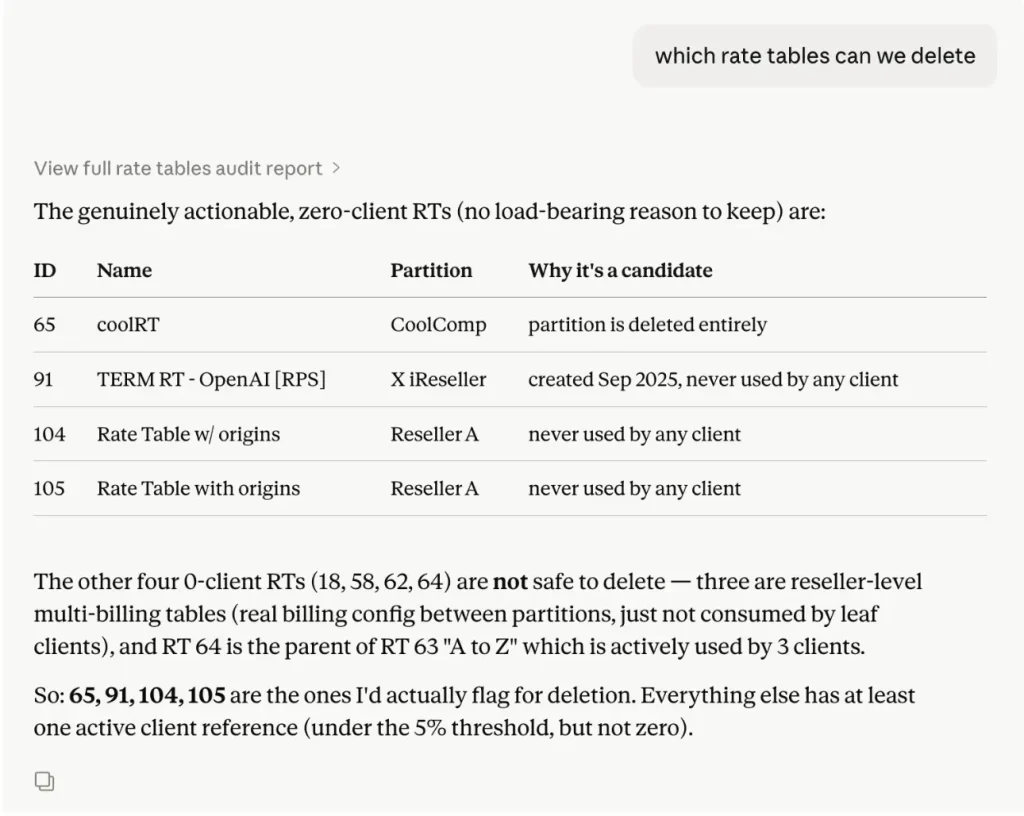
You ask a plain question – “which routing plans aren’t being used by anyone?” or “show me rate tables we can probably delete” – and the skill checks every entity of that type against the current client and account base.

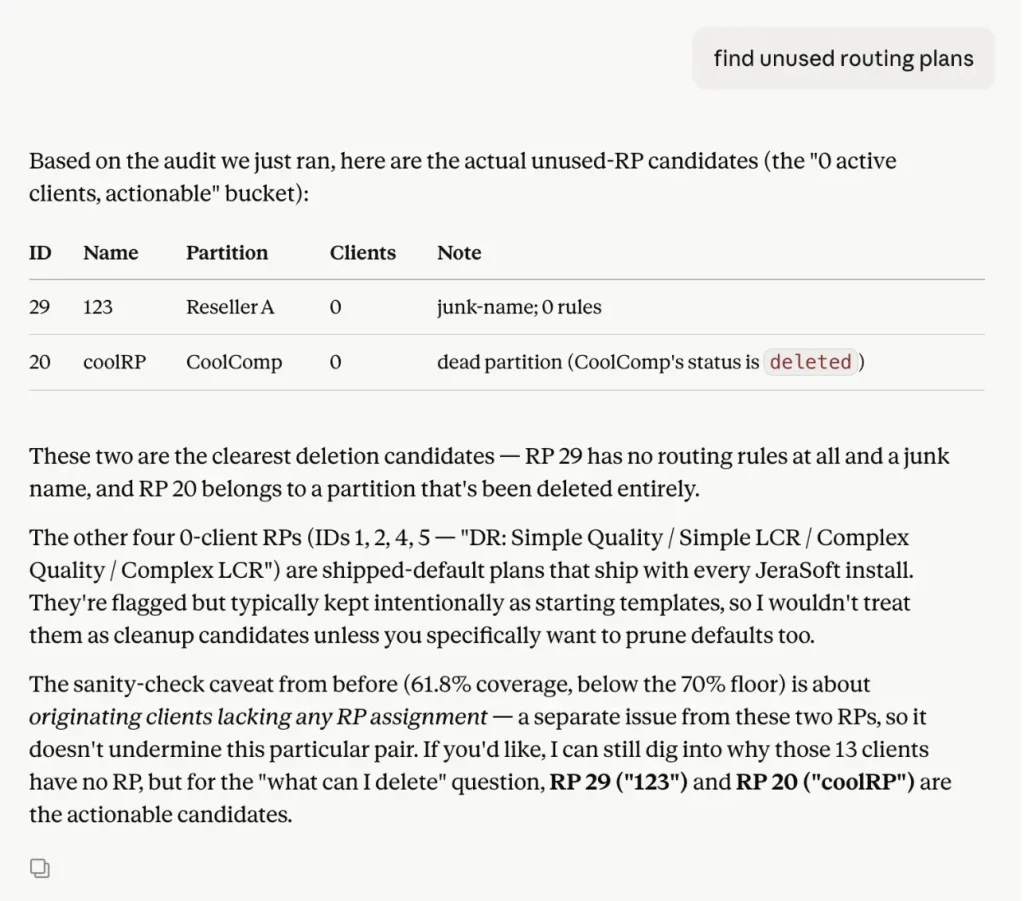
“Out of 47 routing plans, 12 have zero active clients assigned. Another 6 are used by only one client each. The remaining 29 are in active use, with usage ranging from 3 to 140 clients.”

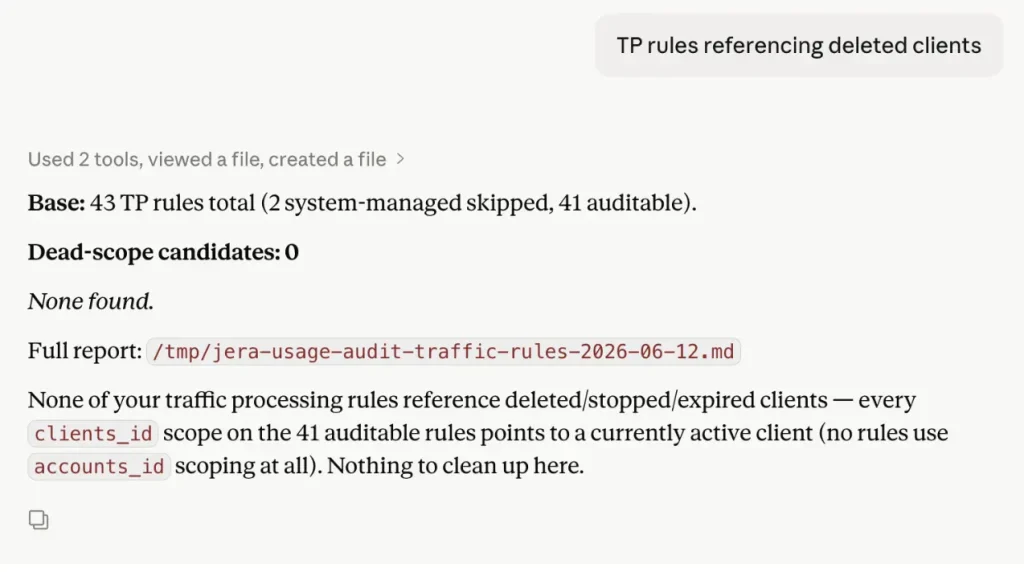
For traffic processing rules, it can go further and flag rules that reference clients or accounts that have been moved to archive:
“8 TP rules reference accounts that no longer exist. These rules are still active, but can never match any real traffic.”

What it doesn’t do
This skill only surfaces candidates; it never deletes anything. The decision to remove or keep an entity is still yours. It also only covers routing plans, rate tables, and TP rules right now (specifically, TP rules tied to clients that are no longer in use). If you ask about other entity types, it’ll tell you that plainly rather than guess.
Why this matters
Unused configuration isn’t just clutter. Every routing plan, rate table, and rule is something your team has to consider – consciously or not – every time they make a change, debug an issue, or onboard a new client. The bigger the list gets, the more cognitive overhead every operational task carries.
Running a usage audit periodically – say, before a system review or once a quarter – turns “we probably have some old stuff in here” into a concrete, prioritised list. And because it’s read-only, there’s no risk in running it often: it simply tells you where to look.
Usage-audit tells you what’s no longer being used. But there’s a related question worth asking separately: are the rules you do use actually well-configured? That’s the job of a different skill – traffic-rules-configurator which we’ll cover in a future article.
What changes in practice
The investigations don’t disappear – someone still needs to act on the findings. What changes is how long it takes to get from “something is wrong” to “here’s what to do about it.”
For experienced team members, it removes the tedious part of their job and lets them focus on decisions rather than data gathering. For less experienced staff, it means they can investigate and correctly diagnose problems from day one, without needing to memorise the platform’s configuration logic first.
Over time, the cumulative effect is significant: faster incident response, fewer revenue gaps from undetected mismatches, and an operations team that spends its time running the business rather than reconstructing what happened yesterday
FAQ
An AI skill is a specialized module that enables an AI agent to solve a specific operational task. It knows what data to retrieve from the billing platform, how to analyze it, and how to present meaningful results to engineers.
The usage-audit skill identifies routing plans, rate tables, and supported traffic processing rules that are no longer actively used. It helps operations teams find configuration objects that may be ready for cleanup without manual investigation.
No. The skill is read-only. It only identifies potential cleanup candidates and reports its findings. Engineers remain responsible for reviewing the results and deciding whether to remove any configuration.
Instead of manually searching through configuration data, engineers can ask questions in natural language. The AI skill gathers the relevant information, analyzes it, and provides clear, actionable answers in minutes.
MCP (Model Context Protocol) enables an AI agent to connect to a telecom billing platform. An AI skill provides the domain-specific knowledge that tells the AI what to investigate, which data to analyze, and how to interpret the results for a particular operational task.
We don’t sell A-Z
Get professional advice
For general and sales inquiries regarding JeraSoft billing solutions, please contact the Sales Team at sales@jerasoft.net or use the form and a team member will get back to you as soon as possible.
Please contact JeraSoft Support for any product or support related questions at support@jerasoft.net or visit JeraSoft Documentation.